Import rules
Importing rules is how you get your engineering standards into Straion. Straion reads your existing standards — security requirements, architecture patterns, coding guidelines, and the agent-instruction files — and turns them into structured rule collections that your code and specs can validate against. See Core Concepts for what a rule is and how Straion uses it.
There are two ways to import:
- From the web app: paste text or upload a file.
- From the CLI: connect your repository with
straion source repo connect. If you only want to import rules, you can instead run/straion-import-rulesinside the repository.
Import from the web app
On your Straion Rules page, click Add rules and choose an import option:
- File — import rules from a file you upload.
- Text — extract rules from pasted or typed text.
This is the quickest way to import a single document or one-off set of standards.
Import with the CLI
Run Straion inside a repository and it lets your coding agent extract rules from the repository’s own instruction files. Want to keep those rules as code in git? Connect the repository instead.
Prerequisites
- The Straion CLI installed and authenticated (
straion login). - At least one coding agent configured with
straion setup. This installs the Straion skills and hooks into Claude Code, GitHub Copilot, or Cursor. See the agent setup guide to verify your installation. - A git repository with an
originremote. Straion detects the repository fromgit remote get-url originand links the imported rules to it, so the import must run from inside a cloned repo. - A frontier model selected in your agent (for example Claude Opus). We recommend running the import with the strongest model you have access to.
What happens step by step
1. Run Straion in your repository
From the root of the repository you want to import, run:
straionThe Straion CLI will guide you through importing rules:
This repository has no rules in your organization yet.
Start importing rules from https://github.com/your-org/your-repo.git?
2. Select an agent to run the import
Straion asks which configured agent should perform the import:
Select an agent to run the import:

❯ ● Claude Code     (Already configured)
  ○ GitHub Copilot  (Not configured)
  ○ Cursor          (Already configured)
Each agent is marked Already configured or Not configured depending on whether straion setup has installed the Straion skills for it. Use the arrow keys (or j/k) to move and Space or Enter to select. Press Esc to dismiss the flow at any step.
Before you select, switch that agent to a frontier model. You get the best rules from the strongest model available to you.
Straion then launches the selected agent and runs the import skill for you:
/straion-import-rules --skip-precheckThe --skip-precheck flag is added automatically — the CLI already confirmed the repository has no rules in step 1, so the agent goes straight to discovering sources. Cursor has no CLI, so selecting it prints instructions to run /straion-import-rules from the Cursor chat yourself instead of launching automatically.
3. The agent discovers your rule sources
The agent reads the instruction files your repository already keeps for coding agents — it does not invent rules from your source code. It looks in three places:
- Seed files — the agent-instruction files at the repository root:
CLAUDE.md,AGENTS.md, andAGENT.md. - Referenced files — any local
.mdor.mdcfile the seeds point to, followed up to two hops deep. References are followed through both Markdown links ([text](path)) and@pathimports, and each file is read only once. - Known rule locations — common convention files probed at the repository root:
.cursor/rules/*.mdc,.cursorrules,.windsurfrules,.clinerules,.github/copilot-instructions.md,CONTRIBUTING.md,STYLEGUIDE.md, andCODESTYLE.md.
Each discovered file is then classified:
- Directive — files that state conventions using words like must, should, never, always, or bulleted rules. These are included.
- Narrative — overviews, architecture rationale, and “why” docs that don’t prescribe how to write code. These are skipped, even when they live in an included file.
- Ambiguous — files that mix both (for example a README with a “Conventions” section). The agent lists these and asks you which to include.
Repositories that already organize their standards into a rules/ directory, partitioned by domain, are an ideal source — each file maps cleanly to one collection.
4. The agent extracts and structures rules
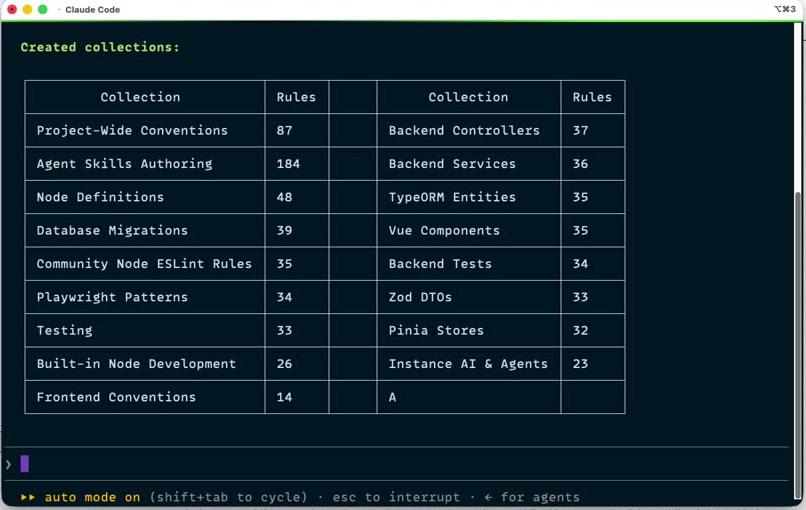
The agent converts each source into one or more collections, grouped by domain (for example “Backend Controllers”, “Vue Components”, “Testing”). Within each collection, every rule becomes a single, self-contained directive that begins with a strength word — MUST, MUST NOT, SHOULD, SHOULD NOT, or MAY — and carries at least one tag. Where the source shows example code, the agent captures compliant and violating examples alongside the rule.
5. The agent uploads the collections
The agent validates every collection and uploads it with the straion import-rules command. When it finishes, it prints a summary of what was created:
Review your imported rules
Open the Straion Rules page to review what was imported.
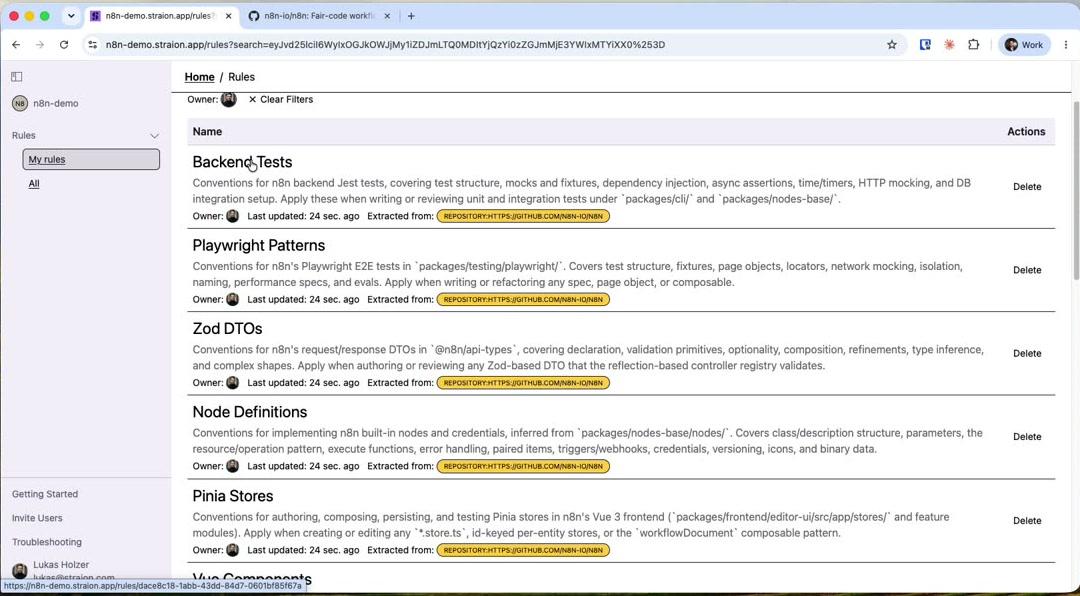
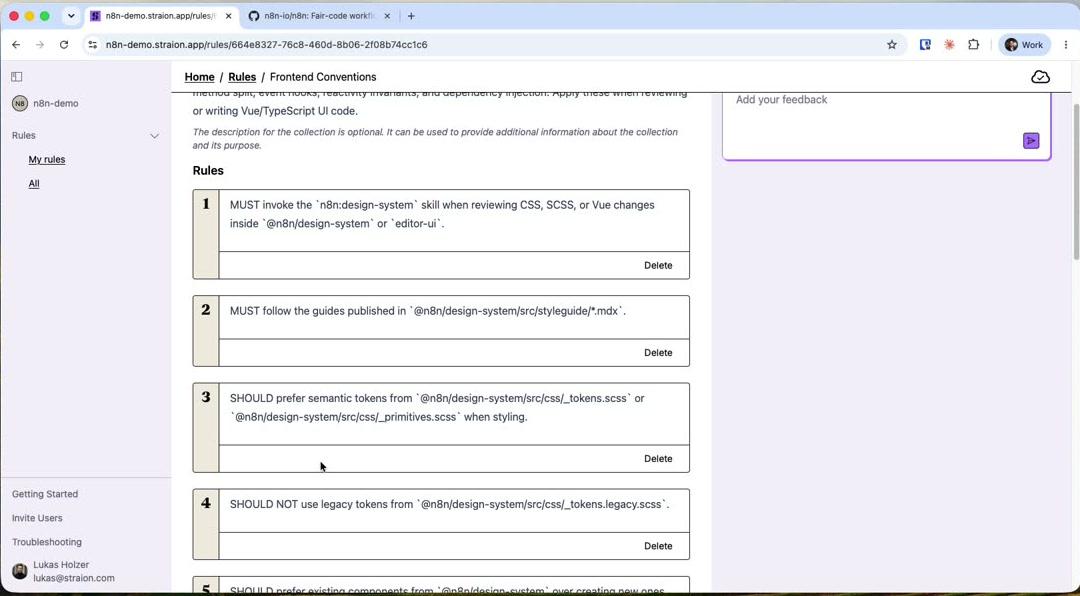
Imported rules are immediately available to the Straion workflows — they are matched against your specs, plans, and code whenever you implement with rules or validate code.
Migrating skills and AGENTS.md to Straion
If your team already keeps its standards in AGENTS.md / CLAUDE.md files and in custom agent skills, the import flow is the fastest way to migrate them into Straion. You don’t need to rewrite anything — just run the import as described above and Straion turns what you already have into rule collections.
Why migrate? Instruction files have real limits:
- They only apply to the one agent that reads them, and only when that file happens to be loaded into context.
- The whole file is dumped into the prompt, relevant or not, instead of being matched to the task at hand.
- They drift per repository and per developer, with no shared source of truth.
Once imported, the same directives become validated rule collections that work across Claude Code, GitHub Copilot, and Cursor, are matched semantically to each task, and are shared by your whole organization.
What gets migrated:
AGENTS.md,CLAUDE.md,AGENT.md— their directives are extracted into collections such as Project-Wide Conventions. Narrative sections (project overviews, “why” explanations) are left behind, since only rules are migrated.- Skill-authoring guidelines — conventions for how you write your agent skills are captured as their own collection (for example Agent Skills Authoring).
- Referenced and tool-specific files — anything the seeds link to, plus
.cursor/rules,.github/copilot-instructions.md, and the other known rule locations, so standards spread across several tools converge into one set.
After migrating, you can slim these files down, since Straion now supplies the matched rules to every agent automatically.
Re-importing
To avoid accidental duplicates, running straion only offers to import when the repository has no rules yet — once rules exist, it skips the prompt.
To refresh your rules after your standards change, invoke the import skill directly from your agent:
/straion-import-rulesWithout --skip-precheck, the skill first runs a precheck. If it finds existing collections for the repository, it asks whether to re-import:
This repository already has N rule collection(s). Do you want me to re-import them? (y/n)Confirming forwards a --force flag to straion import-rules, which re-runs the extraction and overwrites the existing collections.
Troubleshooting
Having issues? Check the troubleshooting guide or reach out to support via email at support@straion.com or on Discord.