Live pane
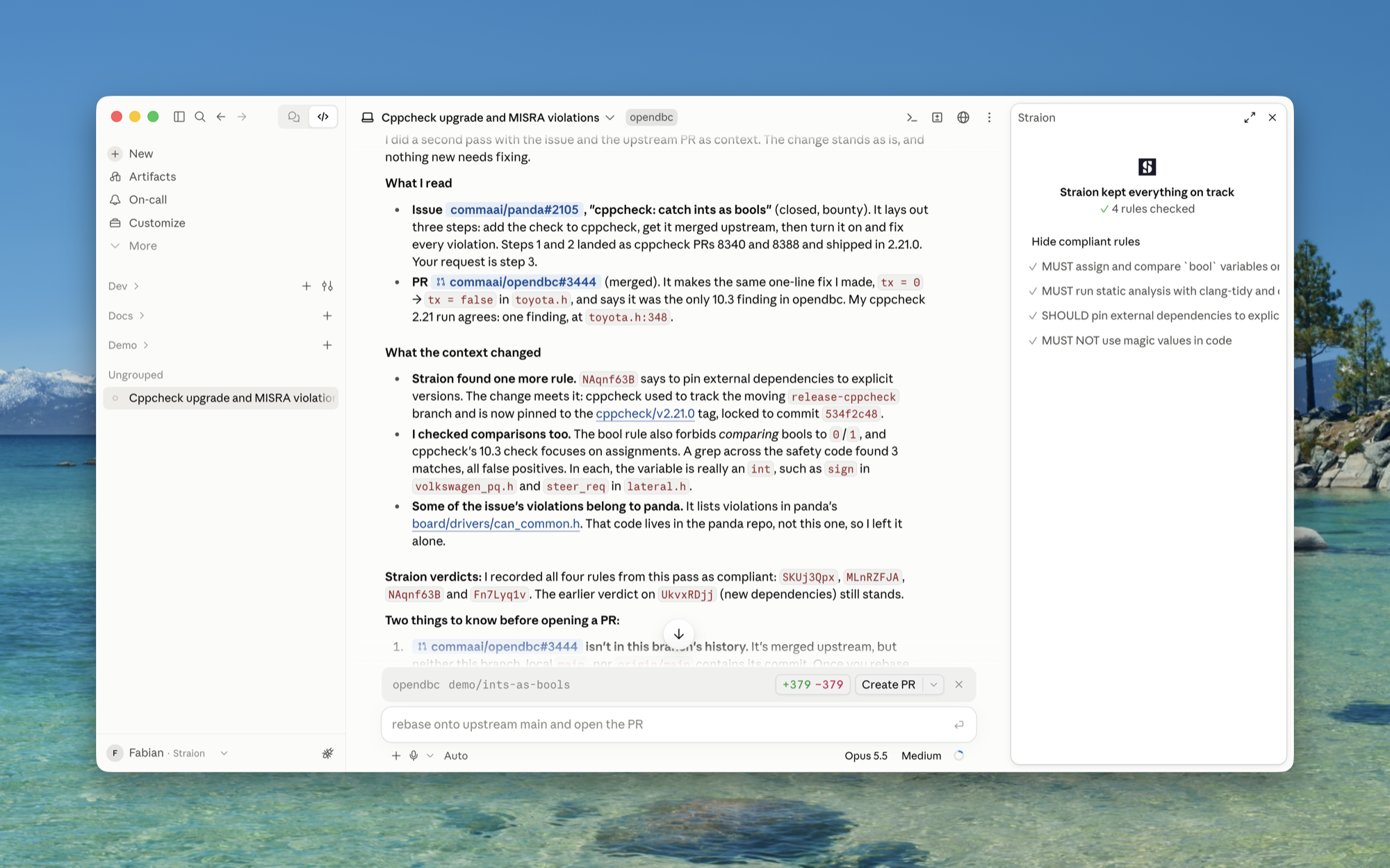
The audit report tells you what happened once a session is over. The live pane shows the same trail while the agent works. It’s a Claude Code mod called straion-trail, a side pane next to the conversation that lists what Straion corrected the agent on, whether the agent fixed it, and when Straion is waiting for you.
The pane reads the same file as straion audit view, so what you see in the pane is what ends up in the report.
Mods are a Claude Code feature, so the pane works only there, in the terminal and in the Code tab of the desktop app. In Cursor and GitHub Copilot you read the trail with straion audit view.
Prerequisites
- Claude Code 2.1.287 or later. That version added mods. Check your version with
claude --versionand update withclaude update. audit.modeset togateortrail. Withoff, Straion records nothing and the pane stays empty.
Set it up
-
Run setup and pick Claude Code. It installs two plugins,
straionandstraion-trail:straion setup -
Check that
audit.modeisgateortrail:straion config audit.mode -
Start a new Claude Code session. The pane opens by itself.
Until the agent asks Straion for rules, the pane reads “Straion is watching”.

What the pane shows
The header sums up the session. “Straion kept everything on track” means no rule needed a fix. “Straion corrected the agent 3 times” means three rules did, and the line below counts how many are fixed and how many are still in progress.
Below the header, each rule that needs your attention gets a row:
| Mark | What it means |
|---|---|
| ? | Your approval is needed. The agent wants to accept a violation or call a rule not applicable. Answer in Claude Code’s permission prompt, as described in When Straion asks you. |
| ● | Straion corrected the agent. The line below the rule says what the agent has to fix. |
| ✓ | The agent fixed it. |
Approved exceptions and compliant rules are folded away behind a toggle below the list.
Outside the pane:
- The status line shows how many rules Straion corrected, for example
Straion · 2 corrected. - Claude Code shows a notification when Straion corrects the agent, when the agent fixes a rule, and when Straion needs your approval. You see them even when the pane is closed.
The pane adds no checks of its own. The agent still grades its own work, so a rule it calls compliant shows up as compliant. See What it doesn’t do.
Commands
| Command | What it does |
|---|---|
/straion-trail | Opens the pane. |
/straion-trail close | Closes the pane. Closing it with its own close button does the same. |
Open or closed by default
Each session remembers whether you opened or closed the pane. If you close it and resume the session later, it stays closed.
A session where you haven’t opened or closed the pane follows the Pane setting of straion-trail:
| Value | When a session starts |
|---|---|
open | The pane opens. |
closed | The pane stays closed. |
open is the default. To change it, run /config in Claude Code and pick a value for Pane under straion-trail. /straion-trail still opens the pane in a session where it’s closed.