Audit trail
Your agent gets your rules from Straion. The audit trail shows whether it followed them and who approved any exceptions.
For every task, Straion hands the agent the rules that apply. The agent has to record a decision on each rule before it can finish. If it wants to ship code that breaks a rule, it has to ask you first, and Straion records it if you approve.
You end up with one record per session. It answers two questions:
- Did the agent follow the rules for this change?
- Why does this code break a rule, and who approved it?
How a session becomes a report

- Find. The agent asks Straion which rules apply to the task. Straion writes every rule it returns into the trail.
- Work. The agent writes the code. It can’t edit or delete the trail.
- Record. For each rule, the agent records whether the code meets it, and what happens if it doesn’t.
- Block. While any rule is still open, the agent can’t end its turn. Straion sends it back with the list of open rules.
- Report. You read one report for the whole session.
What the agent decides
For each rule, the agent first judges the code as compliant, partial, or a violation. Partial compliance counts as a violation.
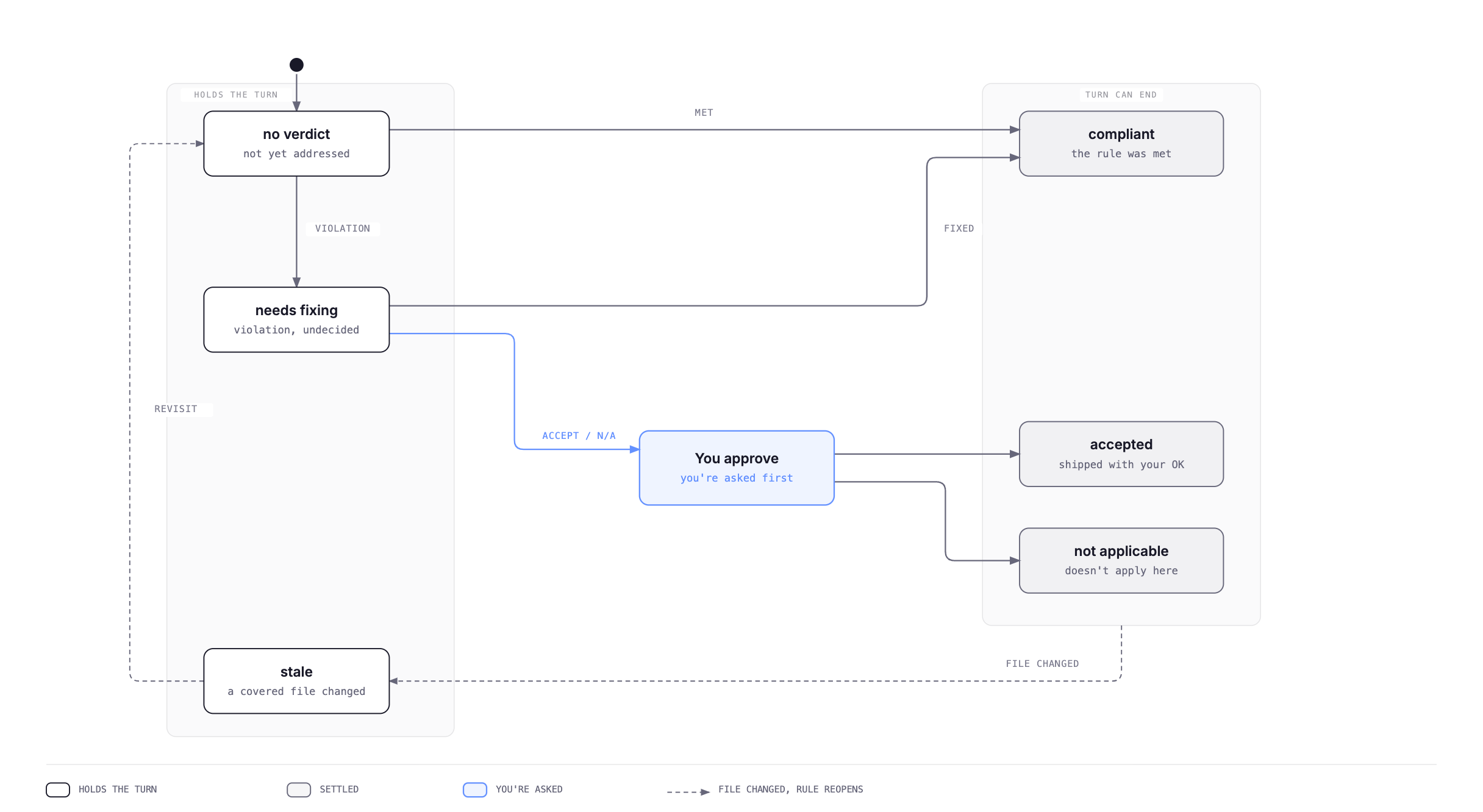
Every rule starts without a verdict. A rule is settled once it’s compliant, an accepted violation, or not applicable. The agent can hand the work back only when every rule is settled. That’s the whole mechanism.
When the code breaks a rule, the agent picks one of three decisions:
| Decision | What it means | Needs your approval |
|---|---|---|
| fix | Correct the violation. | No |
| accept | Ship the violation on purpose. | Yes |
| not applicable | The rule does not apply to this code. | Yes |
Nobody is asked about a fix. The agent can’t finish until the fix is in. Accepting a violation or calling a rule not applicable is a judgment call about your codebase, so the agent has to ask you.
That table covers most rules. A rule marked gate: deny can’t be accepted at all. See Rules that can’t be accepted.
When Straion asks you
Straion asks you only when the agent wants to leave a violation unfixed. Nothing else interrupts you:
- A rule the agent found compliant: no question.
- A violation the agent fixes: no question.
- A rule you already decided in this session: no second question, unless the code changed since.
The question shows up in your coding agent’s own approval prompt. Straion fills it from the rule as written, not from the agent’s summary of it:
Rule  [3kQ9fX2a]  (Backend conventions)
  MUST NOT throw GraphQLError from service classes; resolvers and
  filters own GraphQL error shaping.

Agent claims:  violation
Proposed:      accept, ship the violation
Reason:        "legacy invite path, tracked in JIRA-412"
Files:         services/gateway/src/organization/invite.service.ts

Approving records your decision in the audit trail.
If you approve, Straion records the exception. If you reject, nothing is recorded. The rule stays open and the agent has to come back to it.
The agent can’t fake your approval
The agent never tells Straion that you approved. In gate mode, the command that records an exception only runs if you click approve in your coding agent’s own permission prompt. The agent can’t skip that prompt or answer it for you. The report shows, for every exception, whether a person was asked.
Rules that can’t be accepted
Some rules should never ship broken, no matter who signs off. Add gate: deny to the rule’s frontmatter:
---
$schema: https://straion.com/schemas/rule/v1.json
id: 0b7c2f4e-1d3a-4e8b-9a6f-5c2d8e1f4a7b
gate: deny
meta:
  tags: [security]
---

MUST NOT write access tokens to logs.
A rule without gate gets ask, which is everything described above. The only other value is deny. You set it on each rule. Collections don’t have a gate.
Nobody can accept a violation of a deny rule, not the agent and not you. If the agent tries, Straion refuses and tells it to fix the code. The turn stays open until the fix is in.
| Decision | ask rule | deny rule |
|---|---|---|
| fix | No question | No question |
| accept | You approve | Not possible |
| not applicable | You approve | You approve, then a second person approves before the build passes |
Not applicable stays available because rule search sometimes gets it wrong. It can hand the agent a logging rule for a task that never touches a log. With nothing to fix and nothing it’s allowed to accept, the agent would be stuck, and the turn would never end. So Straion asks you, with the same prompt as any other decision.
What you’re approving is different, though. On an ask rule you can say “yes, this breaks the rule, ship it anyway.” On a deny rule you can’t. The only thing you can approve is “there’s no violation here, this rule doesn’t fit this change.” That’s a claim about the code, and the trail records that you made it.
One person’s word isn’t enough for that claim. A not-applicable decision on a deny rule fails the build until a second person approves it. Calling a real violation not applicable is the only way left to get it through, and it takes two people.
When code changes after a decision
If any file in the repository changes after a decision, the decision reopens:
- A compliant rule goes back to the agent to judge again.
- An accepted violation comes back to you, because the code you approved is no longer the code that ships.
This is the one case where you see the same rule twice in a session.
Reading the report
The trail lives on your machine, one file per session. Two commands read it.
List your sessions, newest first:
straion audit listRead one session by its id, or by the first few characters if they’re unique:
straion audit view 9f3cThe report is plain Markdown on stdout, so you can save it or post it on a pull request:
straion audit view 9f3c > audit-report.md
straion audit view 9f3c | gh pr comment 42 --body-file -
The report opens with the session, the agent, the repo and the time. Then it lists each find-rules call with the rules it returned and their state, then the totals. Open rules are repeated in an Issues section, worst first, so you see what’s unresolved without reading everything. Every accepted violation shows its reason and whether a person was asked.
In Claude Code you can also follow the trail while the agent works, in the live pane.
Audit mode setting
The audit.mode setting has three values:
| Mode | Records decisions | Asks you | Holds the turn |
|---|---|---|---|
gate | Yes | Yes | Yes |
trail | Yes | No | No |
off | No | No | No |
gate is the default, and the Straion plugin sets it up for you. To change it on your machine, edit ~/.straion/config.json:
{ "audit": { "mode": "trail" } }To set it for everyone in your organization, set the STRAION_AUDIT_MODE environment variable, for example in your coding agent’s managed settings, which developers can’t edit. The variable overrides the config file.
Be careful with trail. It sounds like the same record without the interruptions, but you’ll get far fewer decisions. Agents record decisions because Straion won’t let them finish until they do. In trail nothing holds the turn, so agents mostly skip it, and many rules end the session without one. The decisions that do get recorded were never shown to a person, including accepted violations. The report’s Mode line reads “trail — asking was off on this machine,” so nobody mistakes that for a lapse.
In CI and unattended runs
With nobody there to approve, nothing gets approved. On a headless run in gate mode, the agent can fix a violation but can’t accept one. Either the work meets the rules, or it comes back to a person.
Supported agents
The gate works in Claude Code, Cursor, and GitHub Copilot (with the Copilot CLI installed).
What it doesn’t do
The agent grades its own work. When it says a rule is met, nothing else checks the code against that rule, and the trail doesn’t pretend otherwise.
So the trail doesn’t promise your code is correct. In gate mode, it promises something that you can rely on:
Every rule that applied got a decision, and every violation that shipped was accepted by a person.